PAIDIA STUDIO
13. 앱 잠금, 로컬 저장, 개인정보 처리
13. 앱 잠금, 로컬 저장, 개인정보 처리
앱 잠금 설정
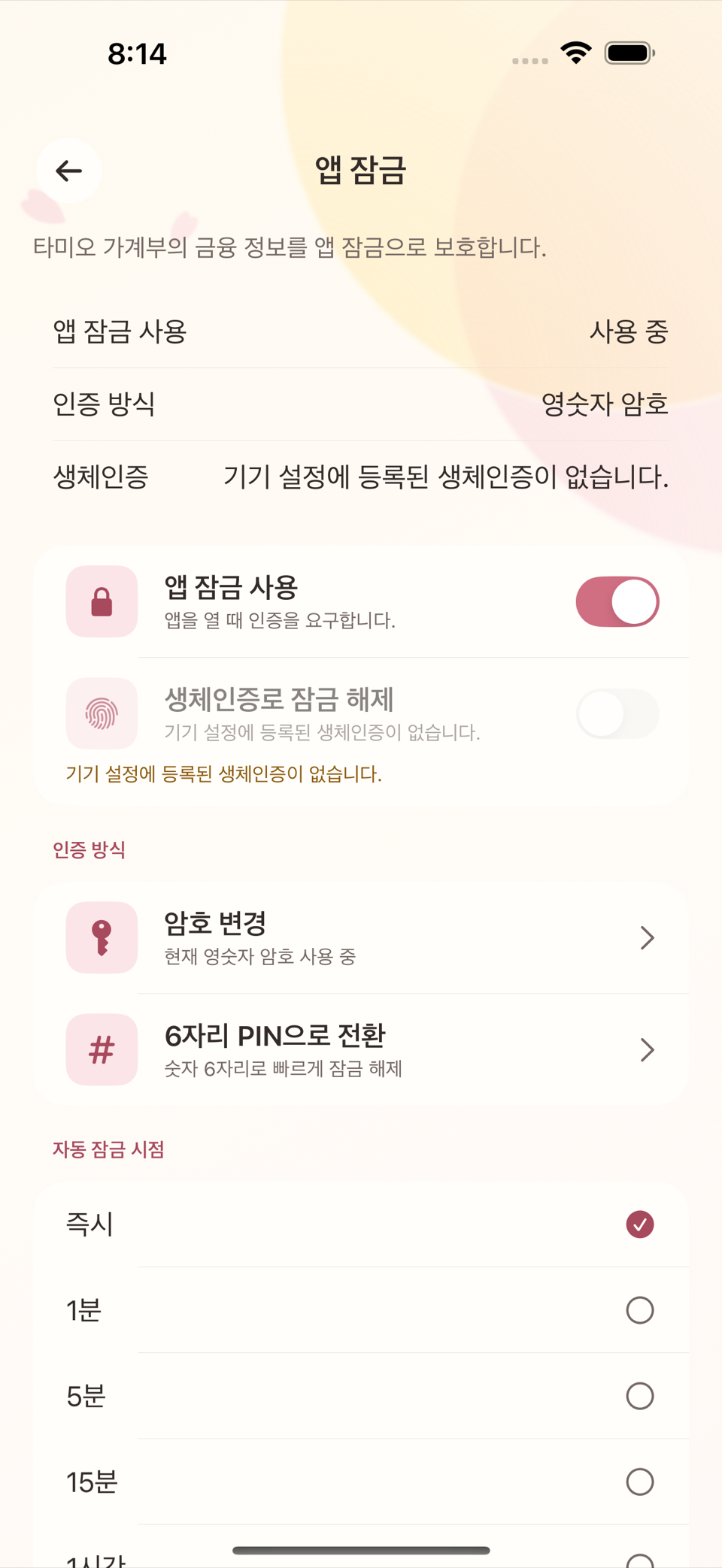
설정의 앱 잠금 화면에서 앱 잠금 사용을 켜면 앱을 열 때마다 인증을 요구한다.
- 생체인증(Face ID/Touch ID)이 있는 기기에서는 "생체인증으로 잠금 해제" 스위치로 지문· 얼굴 인식을 함께 켤 수 있다.
- 처음 설정할 때 PIN 설정 또는 암호 설정 화면에서 숫자 PIN이나 문자 암호를 만든다. 나중에 PIN 변경/암호 변경으로 바꿀 수 있다.
- PIN·암호를 잘못 입력하면 오류 안내가 뜨고 다시 시도할 수 있다.
화면 모드
설정의 테마 및 화면 모양에서 시스템 설정 따르기, 라이트, 다크 중 하나를 고를 수 있다. 라이트 화면은 Citrus Sakura, 다크 화면은 Midnight Citrus Sakura 색 구성을 쓴다. 현재 버전은 이 두 화면 모드만 제공하며, 계절별 테마를 고르는 별도 목록은 없다.
데이터는 이 기기 안에만 있다
타미오는 모든 장부 데이터를 기기 로컬 저장소에만 보관한다. 실시간으로 서버에 동기화하지 않으며, 사용 통계나 광고 목적의 추적도 하지 않는다. 장부 기능이 외부 네트워크와 통신하는 경우는 다음 두 가지뿐이다.
- 환율 조회 — 외화 거래를 입력할 때 환율 정보를 가져오기 위한 통신.
- 기기 간 전송 — 사용자가 직접 실행한 경우에만, 암호화된 채널로 다른 내 기기에 백업을 보내는 통신.
도움말·개인정보 처리방침·고객지원 같은 공개 링크를 직접 열면 해당 웹페이지로 이동하지만, 장부 데이터가 그 링크로 전송되지는 않는다.
영수증 OCR도 서버가 아니라 기기 안에서 처리된다(9장 참고). 앱을 지우거나 초기화하지 않는 한 데이터는 기기와 사용자가 만든 백업 파일에만 존재한다.
개인정보 처리방침
더 자세한 내용은 설정의 개인정보 처리방침(외부 링크)에서 확인할 수 있다. 이 링크는 앱 내 어디서 열어도 항상 같은 공개 문서로 연결된다.
iPad·Mac에서도 앱 잠금 설정 화면과 인증 방식은 iPhone과 다르지 않다 — PIN·암호와, 기기가 지원하는 생체인증(Face ID·Touch ID·Optic ID 중 하나)을 그대로 쓴다. "암호만 지원되는 기기" 같은 플랫폼별 제한은 없다.
ENGLISH
13. App Lock, Local Storage, and Privacy
Setting up App Lock
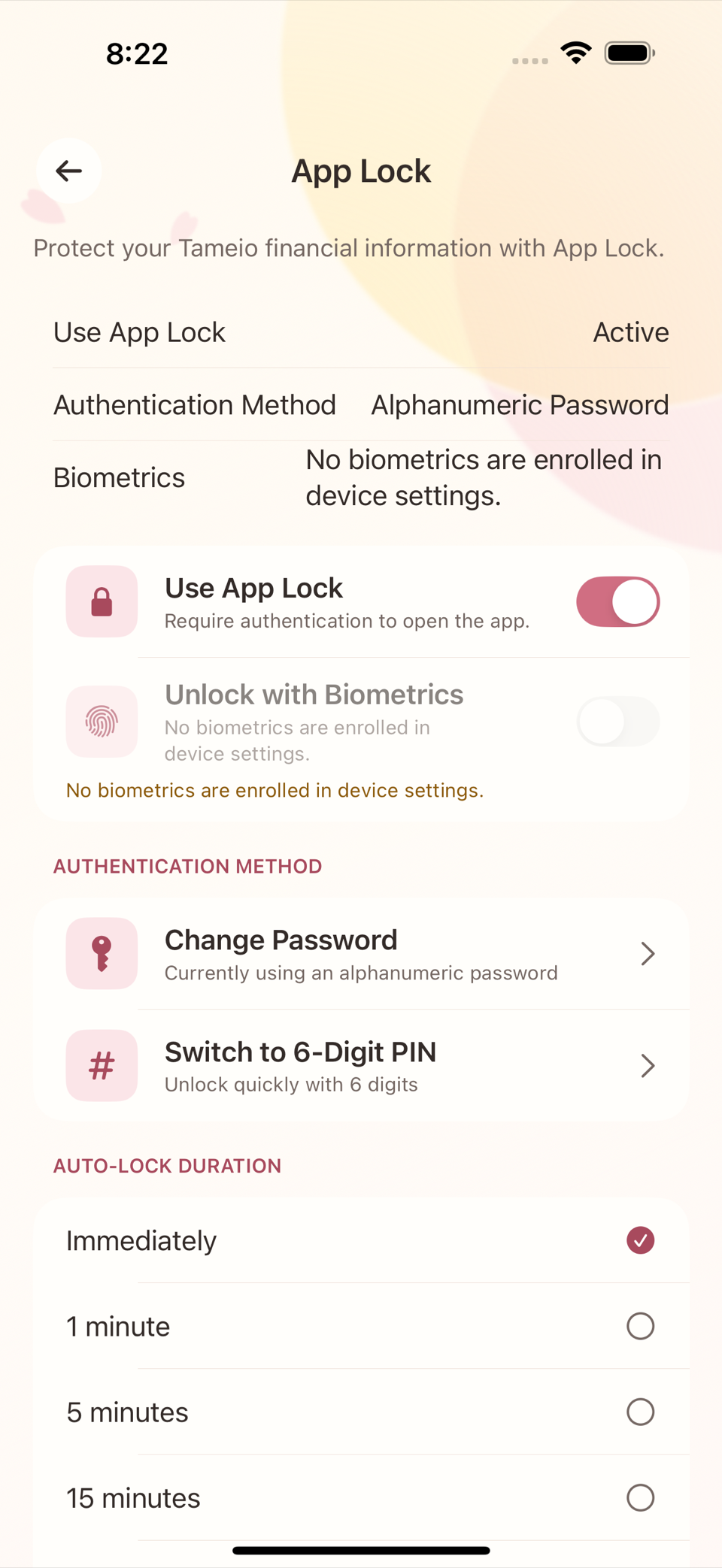
Turn on Use App Lock on the App Lock screen in Settings and the app asks you to authenticate every time you open it.
- On devices with biometrics (Face ID / Touch ID), the Biometrics switch lets you use your fingerprint or face as well — the screen explains it as "Use biometrics for App Lock."
- The first time you set it up you create a numeric PIN or a text password on the Set PIN or Set Password screen. You can change it later with Change PIN or Change Password.
- If you enter the PIN or password incorrectly, an error notice appears and you can try again.
Appearance Mode
In Theme & Appearance under Settings, choose Follow System Settings, Light, or Dark. Light uses the Citrus Sakura palette and Dark uses Midnight Citrus Sakura. The current version provides these two appearance modes; there is no separate seasonal-theme catalog.
Your data stays on this device
Tameio keeps all ledger data in local storage on the device only. It does not sync to a server in real time, and it does not track you for usage analytics or advertising. Ledger features use an external network in only these two cases.
- Exchange rate lookups — to fetch rate information when you enter a foreign currency transaction.
- Device transfer — only when you run it yourself, to send a backup to another of your own devices over an encrypted channel.
Opening a public link such as the guide, privacy policy, or support page takes you to that website, but it does not send your ledger data to the link.
Receipt OCR also runs on the device, not on a server (see chapter 9). Unless you delete the app or reset it, your data exists only on the device and in backup files you have made yourself.
Privacy policy
For more detail, see Privacy Policy in Settings (an external link). Wherever you open this link in the app, it always leads to the same public document.
App Lock setup and the authentication methods are no different on iPad and Mac than on iPhone — you use a PIN or password, plus whichever biometric the device supports (Face ID, Touch ID, or Optic ID). There is no platform-specific restriction such as "this device supports passwords only".