PAIDIA STUDIO
11. 외화와 환율
11. 외화와 환율
기본 통화와 관심 통화
설정의 기본 통화는 예산·통계·순자산을 계산하는 기준 통화다. 관심 통화는 자주 쓰는 외화(여행, 해외 결제 등)를 미리 등록해두는 목록이다. 두 설정 모두 iPad·Mac의 "장부 환경" 섹션, iPhone은 해당 화면으로 바로 진입한다.
외화로 거래를 입력하면
해외 승인 문자를 붙여넣거나 외화 금액을 직접 입력하면, 그 금액(원거래 통화)을 기본 통화로 환산하는 화면이 뜬다. 환산에 쓰인 환율은 그 거래에 그대로 기록되며, 이후 환율이 바뀌어도 이미 저장된 과거 거래의 금액은 바뀌지 않는다.
- 통화별로 소수점 자리(예: 원화는 정수, 달러는 소수 둘째 자리)를 자동으로 맞춘다.
- 환율은 설정 → 환율에서 자동 갱신하거나 수동으로 입력할 수 있다. 자동 갱신이 일부 실패해도 기존 환율은 그대로 유지된다(조용히 0으로 바뀌지 않는다).
- 거래 상세에는 원래 통화 금액, 환율, 환산된 기본 통화 금액이 함께 표시된다.
순자산 계산에 포함되지 않는 것
서로 다른 통화의 평가손익이나 환율 변동분은 순자산 계산에 자동으로 합산되지 않는다. 순자산은 각 계정이 실제로 기록한 거래(이미 환산된 기본 통화 금액)만으로 계산된다.
환율을 직접 입력하려면
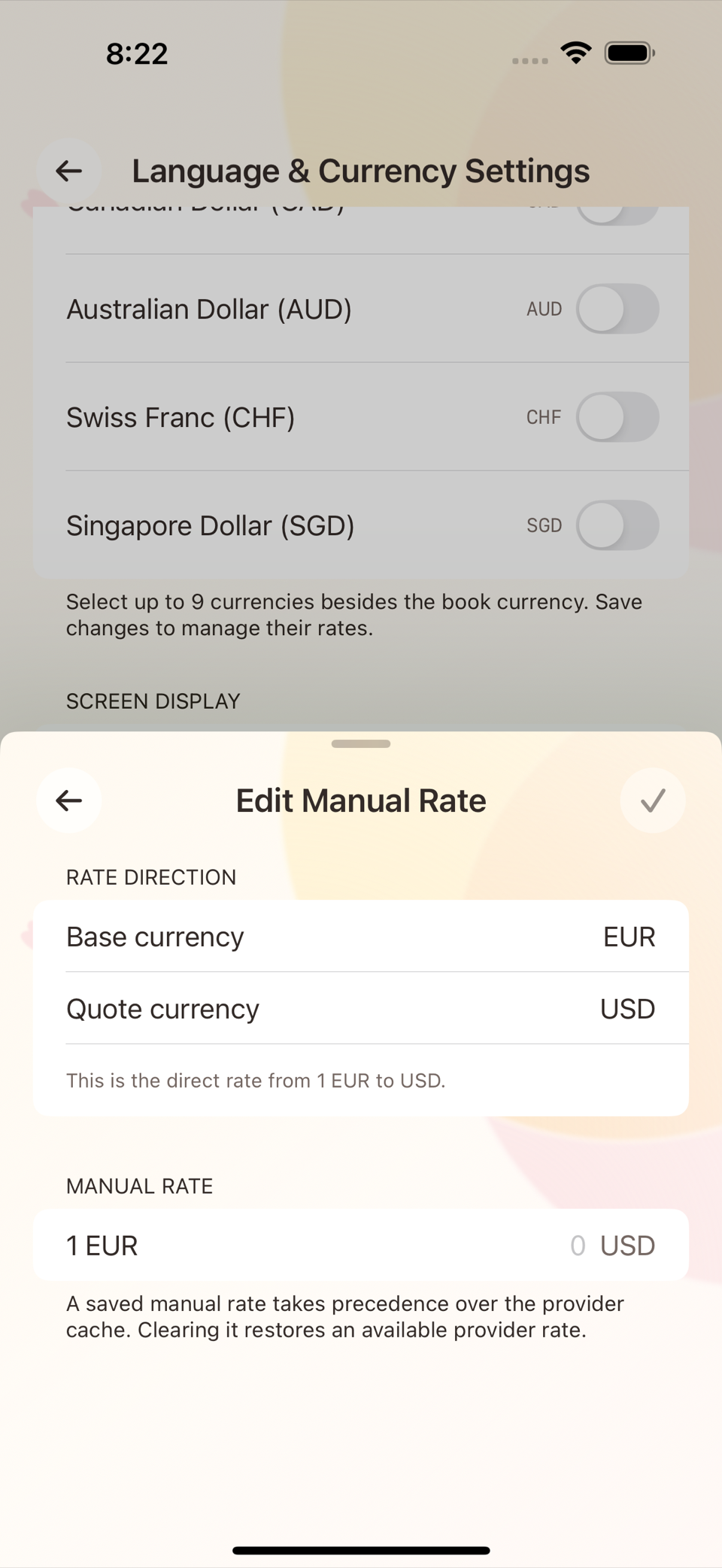
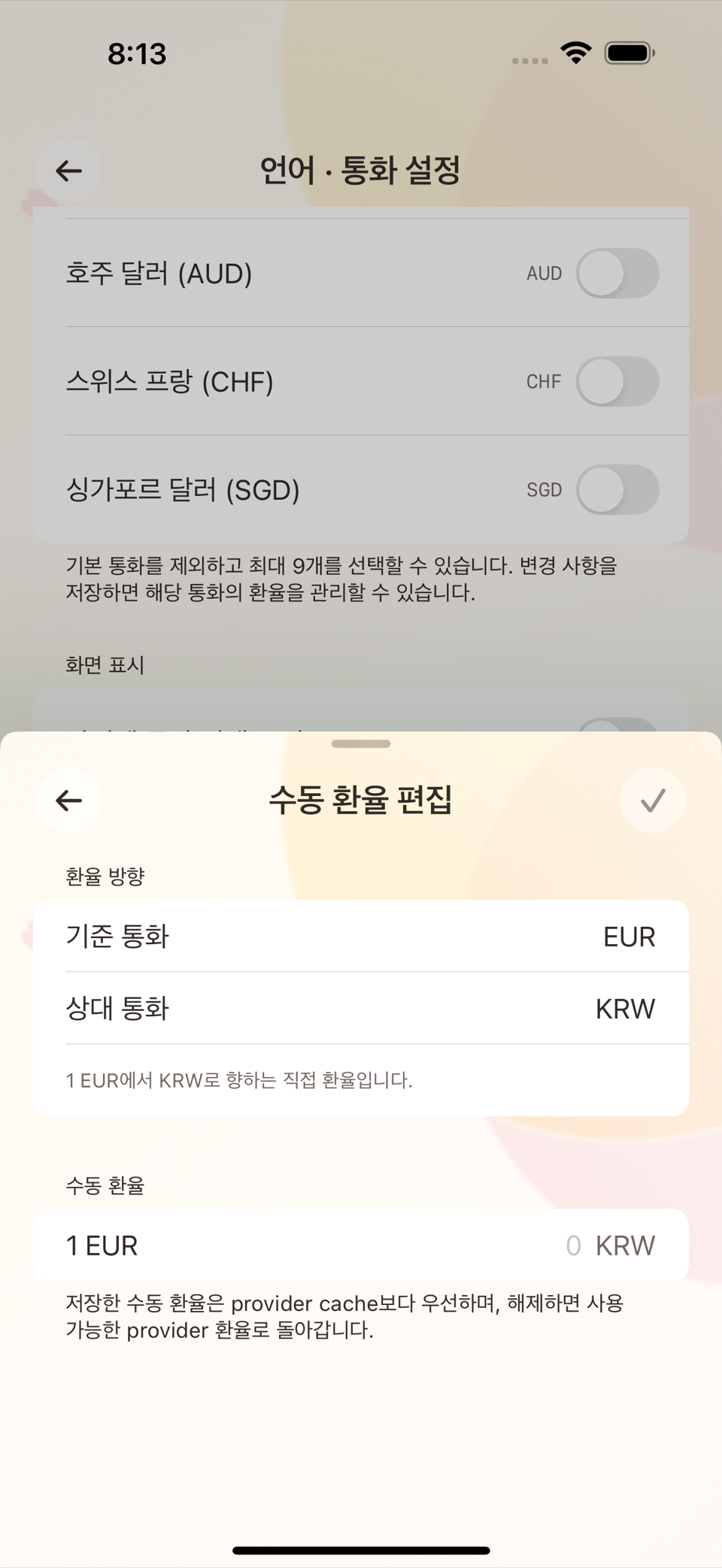
설정 → 환율 화면에서 통화별로 있는 수동 환율 편집 버튼을 누르면 기준 통화·견적 통화를 확인하고 환율 숫자를 직접 입력하는 화면이 뜬다. 한 번 저장한 수동 환율은 이후 자동 조회 결과보다 항상 우선하며, 수동 값을 해제하면 다시 자동 조회 환율로 돌아간다.
자동 갱신이 부분적으로 실패하면 "○○개 환율을 가져오지 못했습니다. 오프라인일 수 있으며 저장된 환율은 그대로 유지됩니다"라는 안내가 뜨고, 기존 환율은 조용히 0이나 빈 값으로 바뀌지 않는다. 저장 자체가 실패하면 "환율을 저장하지 못했습니다. 기존 환율을 유지했으며 다시 시도할 수 있습니다"라는 별도 안내가 뜬다.
ENGLISH
11. Foreign Currency and Exchange Rates
Default currency and interested currencies
Default currency in Settings is the currency used to calculate budgets, statistics, and net worth. Interested currencies is a list where you register the foreign currencies you use often (travel, overseas payments). Both settings live in the "Ledger Environment" section on iPad and Mac; on iPhone you go straight to the corresponding screen.
Entering a transaction in a foreign currency
When you paste an overseas approval message or enter a foreign-currency amount directly, a screen appears that converts that amount (in the original transaction currency) into your default currency. The rate used for the conversion is recorded on that transaction, and later rate changes never alter the amounts of transactions already saved.
- Decimal places are matched to each currency automatically (whole numbers for some currencies, two decimal places for the US dollar, and so on).
- Rates can be refreshed automatically or entered by hand in Settings → Exchange Rate. If an automatic refresh partly fails, the existing rates are kept as they were — they are never silently set to zero.
- The transaction detail shows the original currency amount, the rate, and the converted default currency amount together.
What is not included in net worth
Valuation gains and losses between currencies, and movements caused by exchange rate changes, are not automatically added into net worth. Net worth is calculated only from the transactions each account actually recorded (amounts already converted into the default currency).
Entering a rate by hand
On the Settings → Exchange Rate screen, tap the Edit Manual Rate button available for each currency and a screen opens where you confirm the base and quote currency and type the rate yourself. Once saved, a manual rate always takes precedence over automatically fetched results, and clearing the manual value returns you to the automatically fetched rate.
If an automatic refresh partly fails, a notice appears explaining that some rates could not be fetched, that you may be offline, and that the stored rates are kept as they are — existing rates are never quietly replaced with zero or a blank. If the save itself fails, a separate notice tells you the rates could not be saved, that the existing rates were kept, and that you can try again.