PAIDIA STUDIO
6. 예산 실전 예제
6. 예산 실전 예제
이 장은 처음부터 끝까지 하나의 가상 예제를 따라간다. 숫자는 전부 암산 가능한 만 원 단위이며, 실제 사용자 데이터가 아니다. 예제를 따라 하면서 "왜 예산은 계좌 잔액과 다르게 움직이는가"에 스스로 답할 수 있는 것이 목표다.
예제 설정
- 예산 기간: 매월 1일 시작 (달력월 기준).
- 급여: 매월 23일에 은행 계좌로 3,000,000원 입금.
- 예산 묶음 세 개, 이월 스위치 설정이 서로 다르다(스위치의 정확한 동작은 3단계에서 설명한다).
| 예산 묶음 | 이월 스위치 설정 | 8월 배정 | 8월 실제 사용 | 8월 말 남은 금액 |
|---|---|---|---|---|
| 생활비 | 둘 다 끔 (풀로 반환) | 800,000원 | 650,000원 | +150,000원 |
| 여행비 준비금 | 남은 금액 이월 켬 | 200,000원 | 0원 | +200,000원 |
| 카페/간식 | 초과 사용액 이월 켬 | 100,000원 | 130,000원 | -30,000원 |
8월 1일 시점 배정 가능(풀)이 1,100,000원이었고, 세 묶음에 정확히 800,000 + 200,000 + 100,000 = 1,100,000원을 배정해 풀은 0원이 됐다고 하자.
1단계 — 8월 한 달 동안 지출을 입력한다
각 지출을 해당 카테고리로 입력하면 그 카테고리가 속한 예산 묶음의 사용액이 늘어난다.
- 생활비 묶음: 식비·교통비 등으로 650,000원 지출 → 사용액 650,000원, 남은 금액 800,000 − 650,000 = 150,000원.
- 여행비 준비금: 이번 달은 지출 없음 → 남은 금액 그대로 200,000원.
- 카페/간식: 예상보다 많이 써서 130,000원 지출 → 남은 금액 100,000 − 130,000 = −30,000원 (초과 사용).
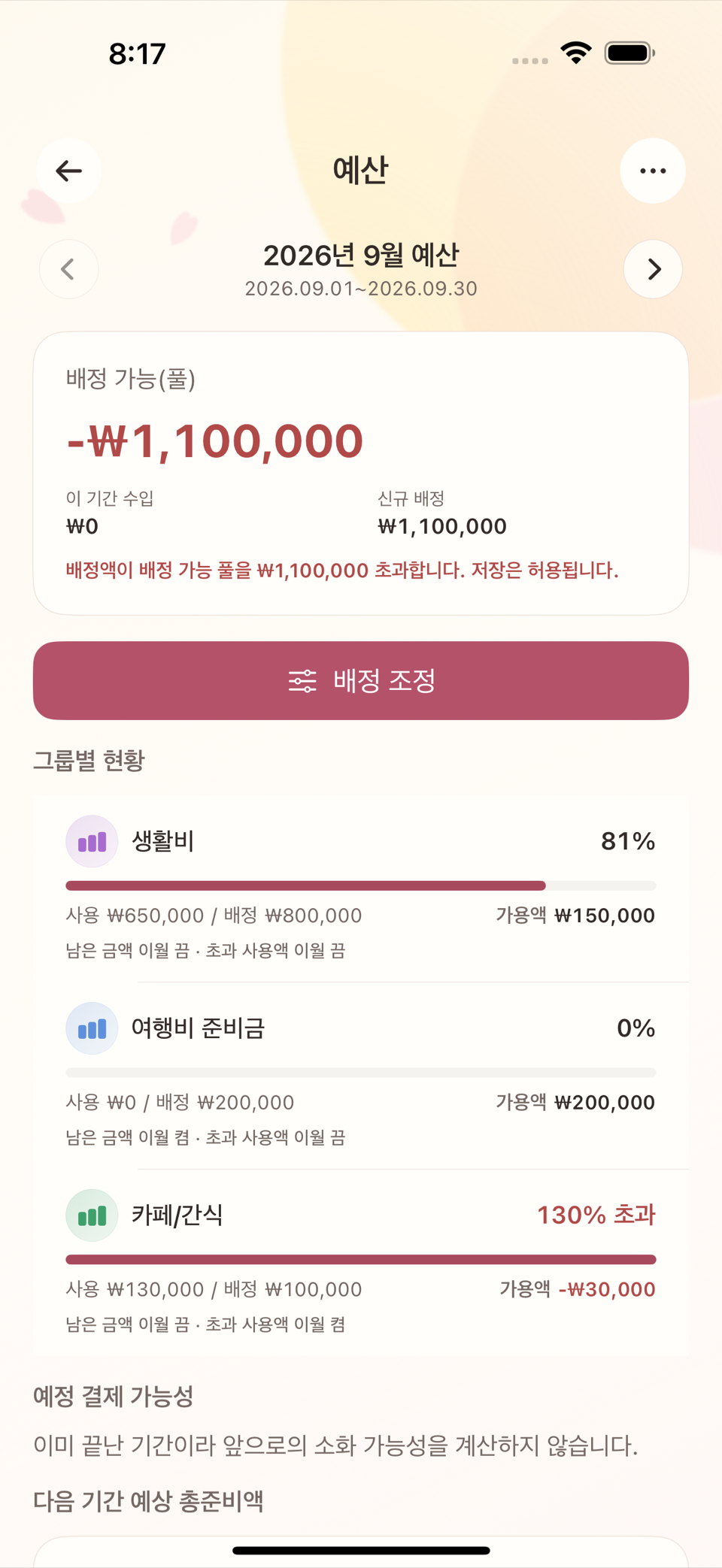
이 시점에서 남은 금액이 음수인 카페/간식은 오류가 아니라 이번 달 예상보다 많이 썼다는 신호다. 계좌 잔액이 마이너스가 됐다는 뜻이 아니라, 그 카테고리에 정한 한도를 넘겼다는 뜻이다.
2단계 — 8월 23일 급여를 실제 수입으로 기록한다
급여 3,000,000원을 은행 계좌 수입 거래로 입력한다. 이 순간 배정 가능(풀)이 3,000,000원 늘어난다. 8월 예산 기간은 이미 배정을 끝냈으므로 이 돈은 9월 예산을 위한 재원이 된다.
급여를 미리 배정하는 기능은 없다. 급여가 실제 거래로 기록된 뒤에만 그 금액을 배정할 수 있다. "이번 달 안에 받을 예정"이라는 이유만으로는 배정 가능액이 늘지 않는다.
3단계 — 8월 말, 기간을 마감하고 9월로 넘어간다
각 예산 묶음에는 남은 금액의 부호마다 따로 켜고 끌 수 있는 이월 스위치 두 개가 있다 — 남은 금액 이월(양수일 때)과 초과 사용액 이월(음수일 때). 스위치를 켜면 그 부호의 금액을 같은 묶음에 남기고, 끄면 배정 가능(풀) 쪽으로 옮긴다. 이 예제의 세 묶음은 다음처럼 설정돼 있다.
| 예산 묶음 | 남은 금액 이월 | 초과 사용액 이월 | 8월 말 상태 | 9월 시작 시 묶음 잔액 | 풀에 생기는 변화 |
|---|---|---|---|---|---|
| 생활비 | 끔 | 끔 | +150,000원 (양수) | 0원 (리셋) | +150,000원 반환 |
| 여행비 준비금 | 켬 | — | +200,000원 (양수) | +200,000원 (유지) | 변화 없음 |
| 카페/간식 | — | 켬 | −30,000원 (음수) | −30,000원 (유지) | 변화 없음 |
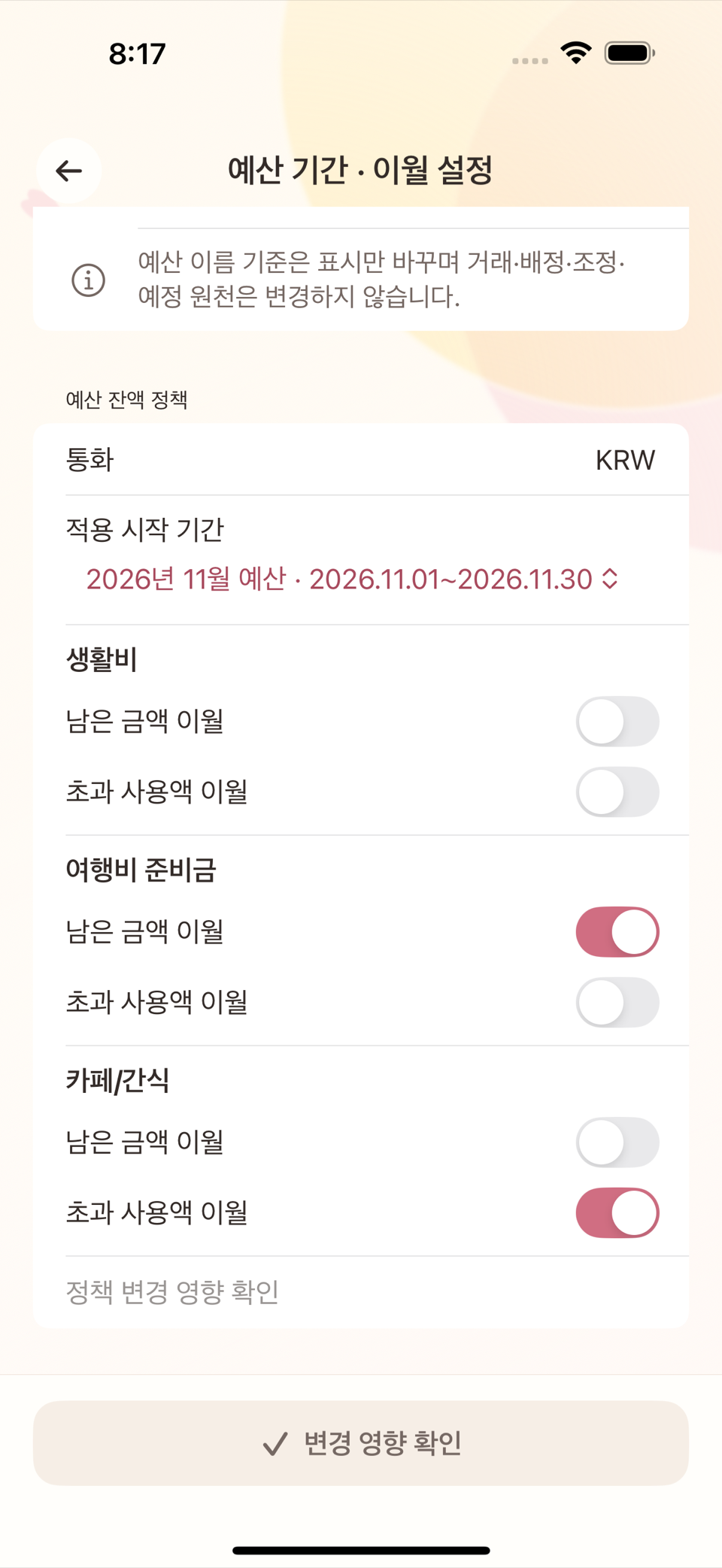
두 스위치 조합 모두 돈이 생기거나 사라지지 않는다. 같은 금액이 "묶음 안"에 남을지, "풀로 돌아갈지"만 달라진다. 이 예제에서 9월 1일 풀은 다음과 같이 계산된다.
9월 1일 풀 = 8월 말 풀(0원) + 8월 급여(3,000,000원) + 생활비 반환분(150,000원)
           = 3,150,000원
4단계 — 9월 배정을 정한다
예산 배정 화면에서 각 묶음에 이번 기간 쓰고 싶은 총액(목표)을 입력하면, 화면이 이미 이월된 금액을 고려해 실제로 저장할 신규 배정을 자동 계산해준다. 카페/간식처럼 이월이 음수인 묶음에서 이 차이가 분명히 드러난다.
| 예산 묶음 | 9월 이월 | 9월에 쓰고 싶은 목표 | 자동 계산된 신규 배정 | 풀 변화 |
|---|---|---|---|---|
| 생활비 | 0원 | 800,000원 | 800,000원 | −800,000원 |
| 여행비 준비금 | 200,000원 | 300,000원 | 100,000원 | −100,000원 |
| 카페/간식 | −30,000원 | 100,000원 | 130,000원 | −130,000원 |
카페/간식은 "9월에도 10만 원짜리 예산으로 쓰고 싶다"는 목표(100,000원)를 그대로 입력해도, 지난달 초과분 30,000원을 먼저 메워야 하므로 화면이 자동으로 신규 배정 130,000원을 계산해 저장한다. 사용자가 130,000원을 직접 암산해 입력할 필요는 없다.
9월 1일 풀 = 3,150,000 − 800,000 − 100,000 − 130,000 = 2,120,000원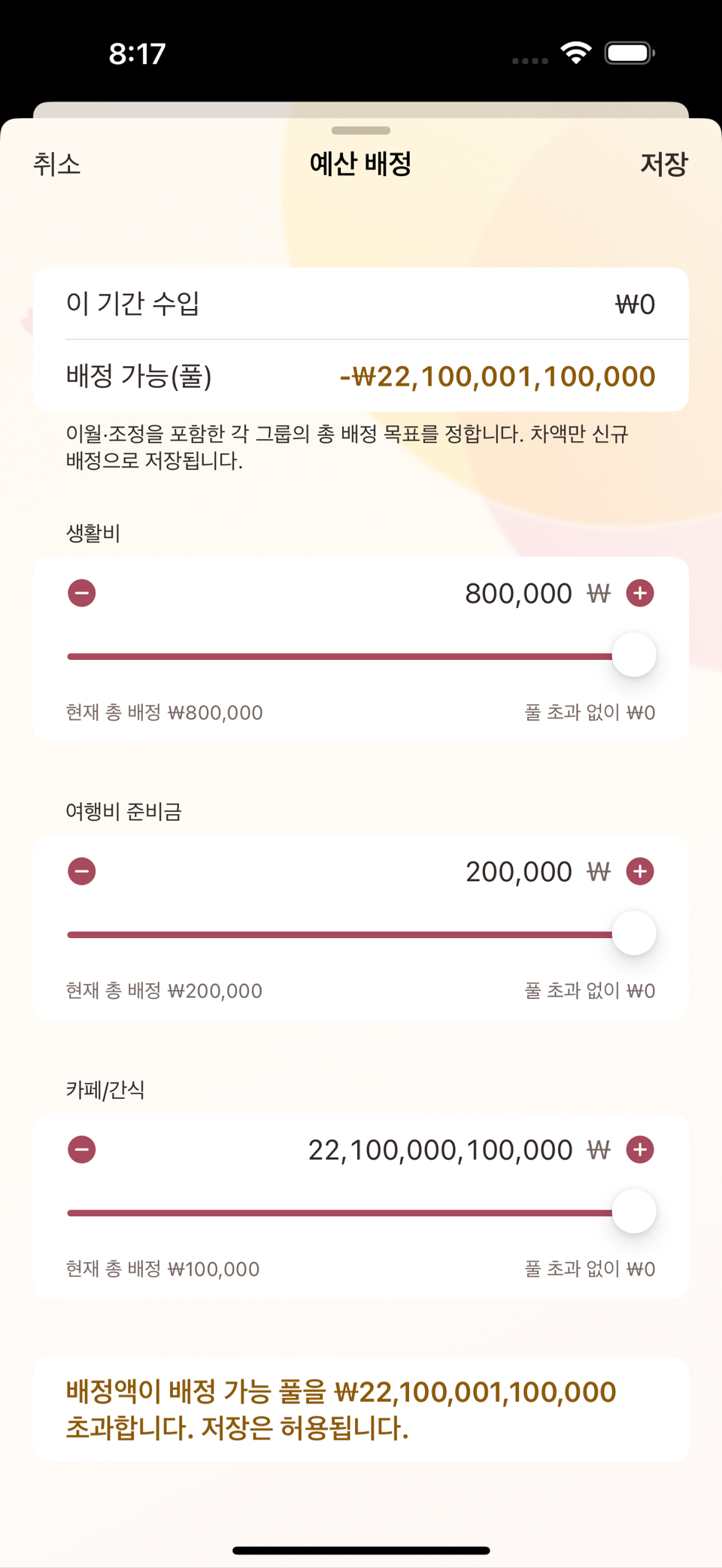
예산 배정 화면 — 카페/간식 묶음의 이월 −30,000원과 목표 100,000원, 자동 계산된 신규 배정 130,000원
검산
두 시점 모두에서 다음 항등식이 성립해야 한다.
전체 예산가치 = 배정 가능 풀 + 모든 예산 묶음의 남은 금액- 8월 말(마감 전): 풀 3,000,000 + (150,000 + 200,000 − 30,000) = 3,320,000원.
- 9월 1일(마감·재배정 후): 풀 2,120,000 + (800,000 + 300,000 + 100,000) = 3,320,000원.
숫자가 정확히 같다. 마감과 재배정을 거치며 돈이 늘거나 준 것이 아니라 위치만 이동했다는 뜻이다.
자주 하는 오해 정리
- "이번 달 급여 예정이 있으니 지금 배정할 수 있다" — 아니다. 배정은 실제로 기록된 수입에서만 가능하다.
- "풀이 음수면 뭔가 잘못됐다" — 항상 오류는 아니다. 예산 기간(달력월)과 급여 주기(23일)가 다르면 월초에 일시적으로 풀이 부족해 보일 수 있다. 이런 경우 한 달 앞서 예산을 편성하면 해결된다 (예: 8월 23일 급여를 9월 예산에 배정).
- "카테고리별로 예산을 따로 저장한다" — 아니다. 카테고리는 분류일 뿐이고, 여러 카테고리를 묶은 것이 예산 묶음이다. 카테고리를 새로 만들어도 예산 묶음에 연결하지 않으면 그 지출은 특정 묶음이 아니라 풀 전체를 줄인다.
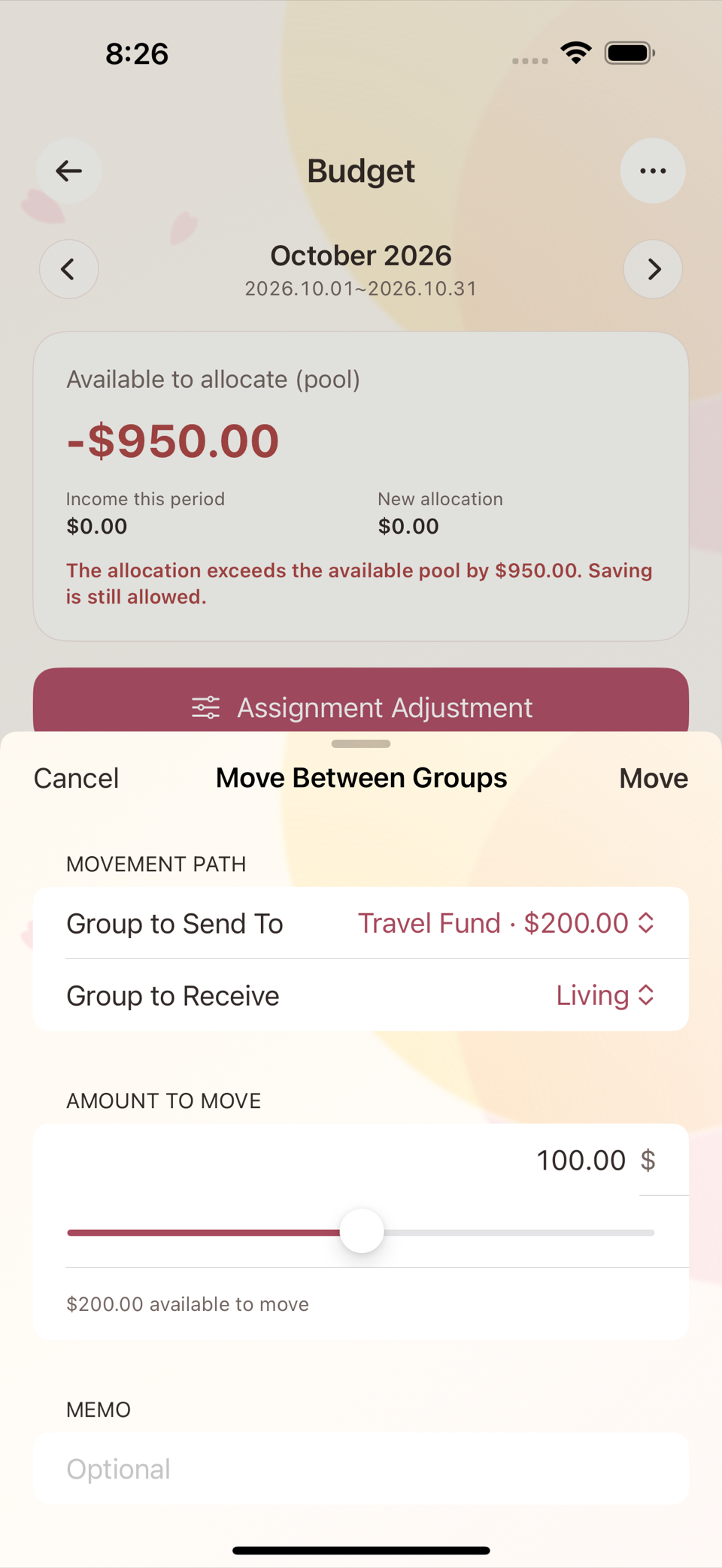
예산 배정 화면은 각 예산 묶음 이름이 섹션 제목이고, 그 아래 −/+ 버튼과 슬라이더가 딸린 숫자 입력칸(별도 라벨 없이 금액만 입력)이 목표 배정액 필드다. 아래에서 설명하는 "그룹 간 이동"은 이 화면과 별개의 독립된 화면이다.
참고 — 배정을 다른 묶음으로 옮기기
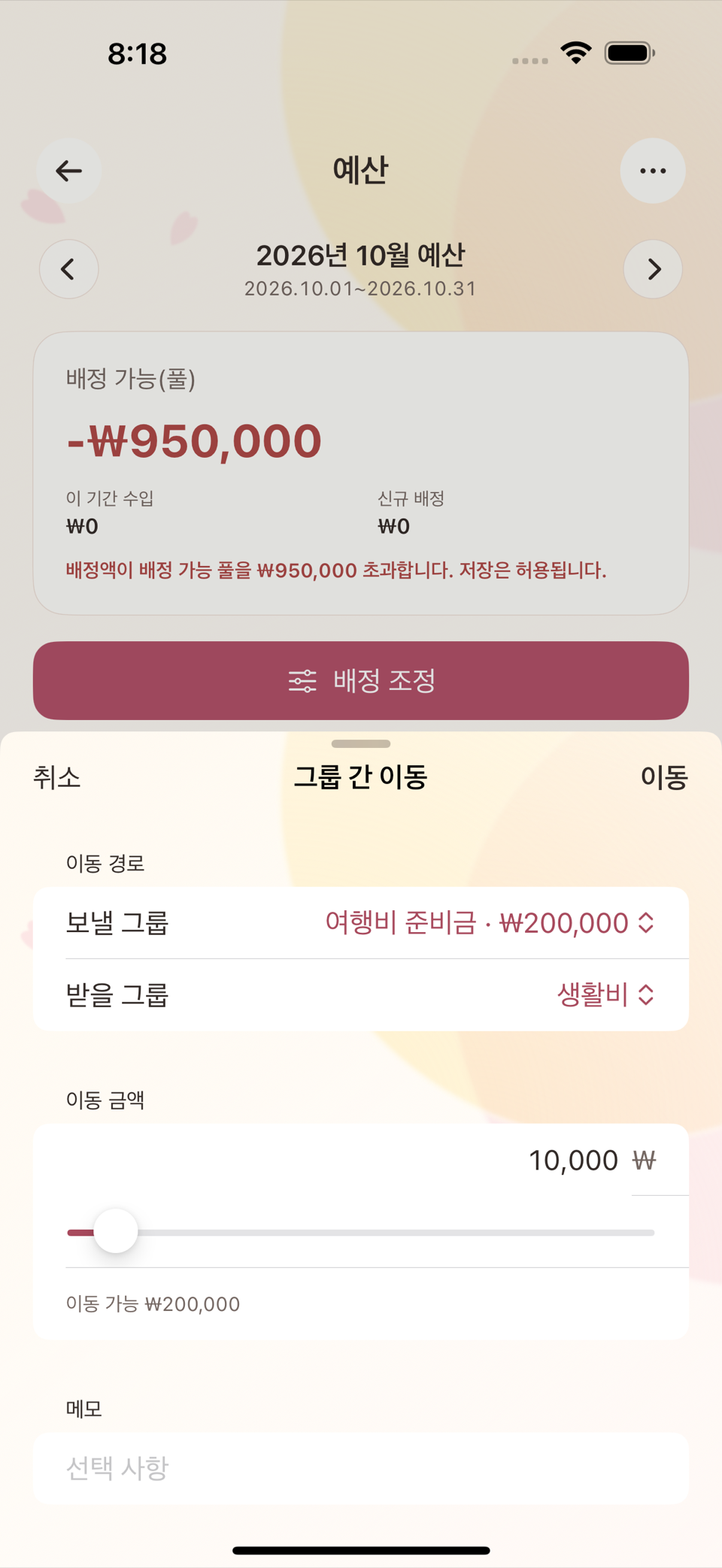
한 묶음에 너무 많이 배정했다면 풀을 거치지 않고 그룹 간 이동 화면에서 두 묶음 사이의 금액을 바로 옮길 수 있다. 이동 전후 두 묶음 금액의 합은 그대로 유지된다(합계 0 이동).
ENGLISH
6. Budgets — A Worked Example
This chapter follows one imaginary example from start to finish. Every figure is a round number you can do in your head, and none of it is real user data. The goal is that by the end you can answer "why does a budget move differently from an account balance?" yourself.
The setup
- Budget period: monthly, starting on the 1st (calendar months).
- Salary: $3,000 paid into the bank account on the 23rd of each month.
- Three budget groups, each with different carryover switch settings (the switches are explained precisely in step 3).
| Budget group | Carryover switches | August allocated | August actually spent | Left at end of August |
|---|---|---|---|---|
| Living | Both off (returned to the pool) | $800 | $650 | +$150 |
| Travel Fund | Rollover remaining amount on | $200 | $0 | +$200 |
| Cafe/Snacks | Rollover overspending on | $100 | $130 | −$30 |
Say that on 1 August the Available to allocate (pool) was $1,100, and exactly 800 + 200 + 100 = $1,100 was allocated across the three groups, leaving the pool at $0.
Step 1 — Spend through August
Entering each expense under its category increases the spent amount of the budget group that category belongs to.
- Living group: $650 spent on food, transport, and so on → spent $650, left 800 − 650 = $150.
- Travel Fund: nothing spent this month → left unchanged at $200.
- Cafe/Snacks: more than expected, $130 spent → left 100 − 130 = −$30 (overspent).
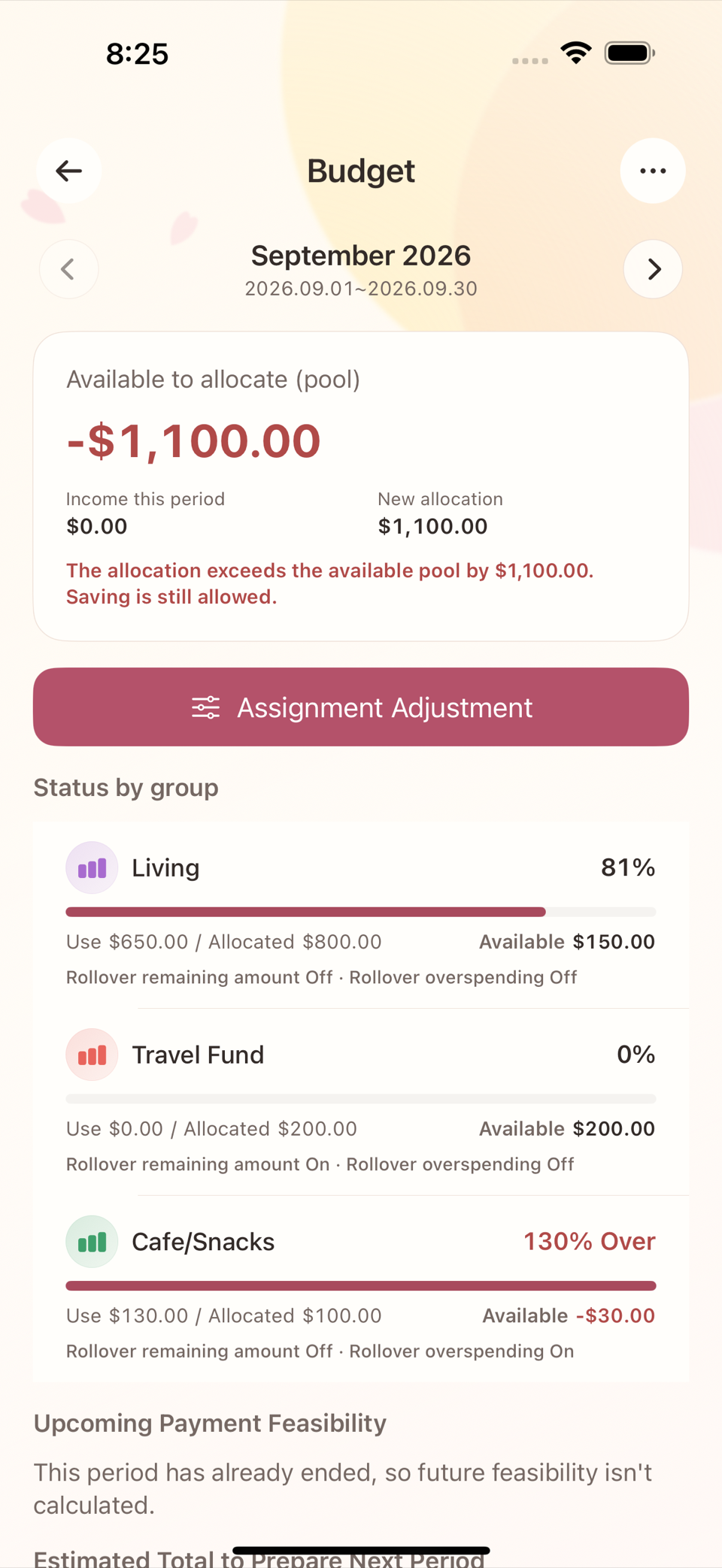
A negative amount left in Cafe/Snacks is not an error; it is a signal that you spent more than planned this month. It does not mean your account went negative — it means you went past the limit you set for that category.
Step 2 — Record the 23 August salary as real income
Enter the $3,000 salary as an income transaction into the bank account. At that moment Available to allocate (pool) increases by $3,000. The August budget period has already been allocated, so this money becomes the funding for September.
There is no feature for allocating a salary in advance. You can only allocate money once it has been recorded as a real transaction. "I am due to be paid later this month" does not increase the amount available to allocate.
Step 3 — Close out August and move into September
Every budget group has two carryover switches that you turn on and off separately for each sign of the amount left — Rollover remaining amount (when positive) and Rollover overspending (when negative). Switching one on keeps that amount in the same group; switching it off moves the amount to the Available to allocate (pool). The three groups in this example are set up as follows.
| Budget group | Rollover remaining amount | Rollover overspending | End of August | Group balance on 1 September | Change to the pool |
|---|---|---|---|---|---|
| Living | Off | Off | +$150 (positive) | $0 (reset) | +$150 returned |
| Travel Fund | On | — | +$200 (positive) | +$200 (kept) | No change |
| Cafe/Snacks | — | On | −$30 (negative) | −$30 (kept) | No change |
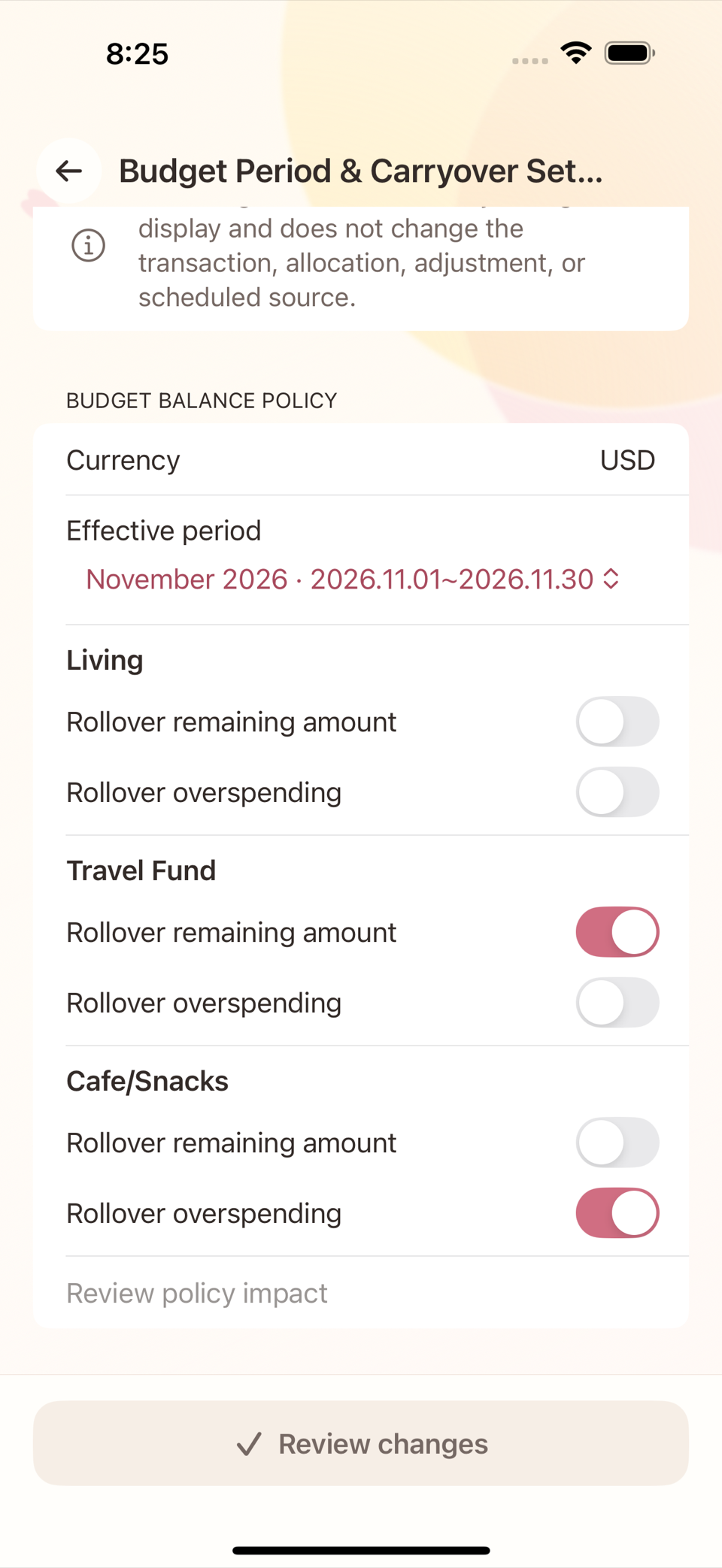
Neither combination of switches creates or destroys money. All that changes is whether the same amount stays "inside the group" or "goes back to the pool". In this example the pool on 1 September works out as follows.
Pool on 1 September = pool at end of August ($0) + August salary ($3,000)
                      + amount returned by Living ($150)
                    = $3,150
Step 4 — Decide the September allocations
On the Allocate Budget screen you enter the total you want each group to have for this period (the target), and the screen works out the new allocation it will actually save by taking the amount already carried over into account. The difference is clearest in a group like Cafe/Snacks whose carryover is negative.
| Budget group | September carryover | Target for September | New allocation, calculated | Change to the pool |
|---|---|---|---|---|
| Living | $0 | $800 | $800 | −$800 |
| Travel Fund | $200 | $300 | $100 | −$100 |
| Cafe/Snacks | −$30 | $100 | $130 | −$130 |
For Cafe/Snacks you simply enter the target you want — "I want a $100 budget in September too" ($100) — and because last month's $30 overspend has to be covered first, the screen works out and saves a new allocation of $130 for you. You never have to do that arithmetic in your head.
Pool on 1 September = 3,150 − 800 − 100 − 130 = $2,120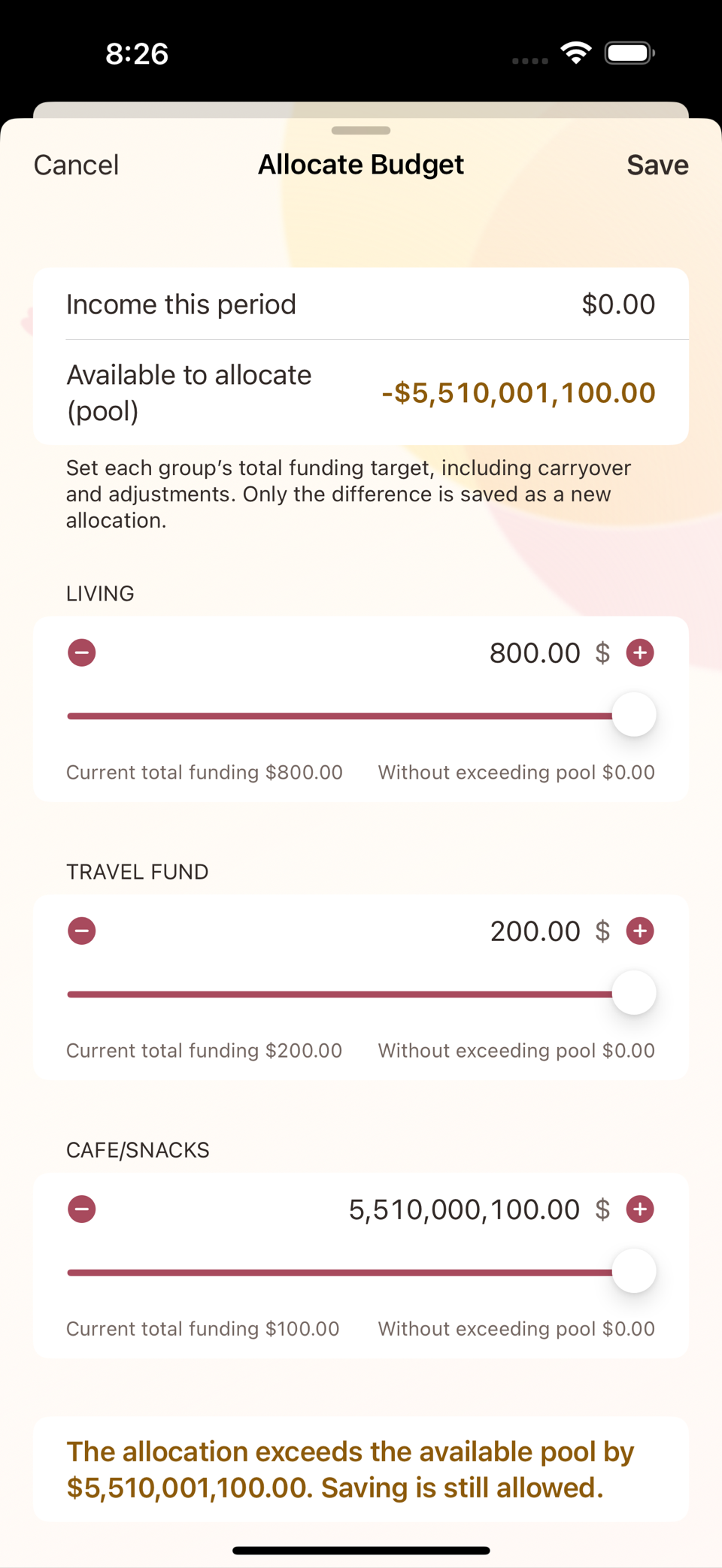
Checking the arithmetic
The following identity has to hold at both points in time.
total budget value = available pool + amount left in every budget group- End of August (before closing): pool 3,000 + (150 + 200 − 30) = $3,320.
- 1 September (after closing and reallocating): pool 2,120 + (800 + 300 + 100) = $3,320.
The figures match exactly. Closing the period and reallocating moved money around; it did not create or lose any.
Common misunderstandings
- "My salary is due this month, so I can allocate it now." No. You can only allocate income that has actually been recorded.
- "A negative pool means something is broken." Not always. If the budget period (calendar month) and the payday (the 23rd) do not line up, the pool can look short at the start of a month. Budgeting one month ahead solves it — for example, allocating the 23 August salary to the September budget.
- "Budgets are stored per category." No. A category is only a classification; a budget group is a bundle of categories. Create a new category and leave it unconnected to a budget group, and its spending reduces the whole pool rather than any one group.
On the Allocate Budget screen each budget group name is a section heading, and beneath it the number field with − / + buttons and a slider (amount only, with no separate label) is the target allocation field. The "move between groups" flow described below is a separate screen.
Note — moving an allocation to another group
If you allocated too much to one group, you can move money straight between two groups on the Move Between Groups screen, without going through the pool. The two groups' amounts still add up to the same total before and after the move (a zero-sum move).