PAIDIA STUDIO
3. 계정 만들기와 시작 잔액
3. 계정 만들기와 시작 잔액
계정은 돈이 실제로 있거나 빚이 잡히는 위치다(2장 참고). 이 장에서는 새 계정을 만들고 시작 잔액을 맞추는 방법을 다룬다.
여섯 가지 계정 유형
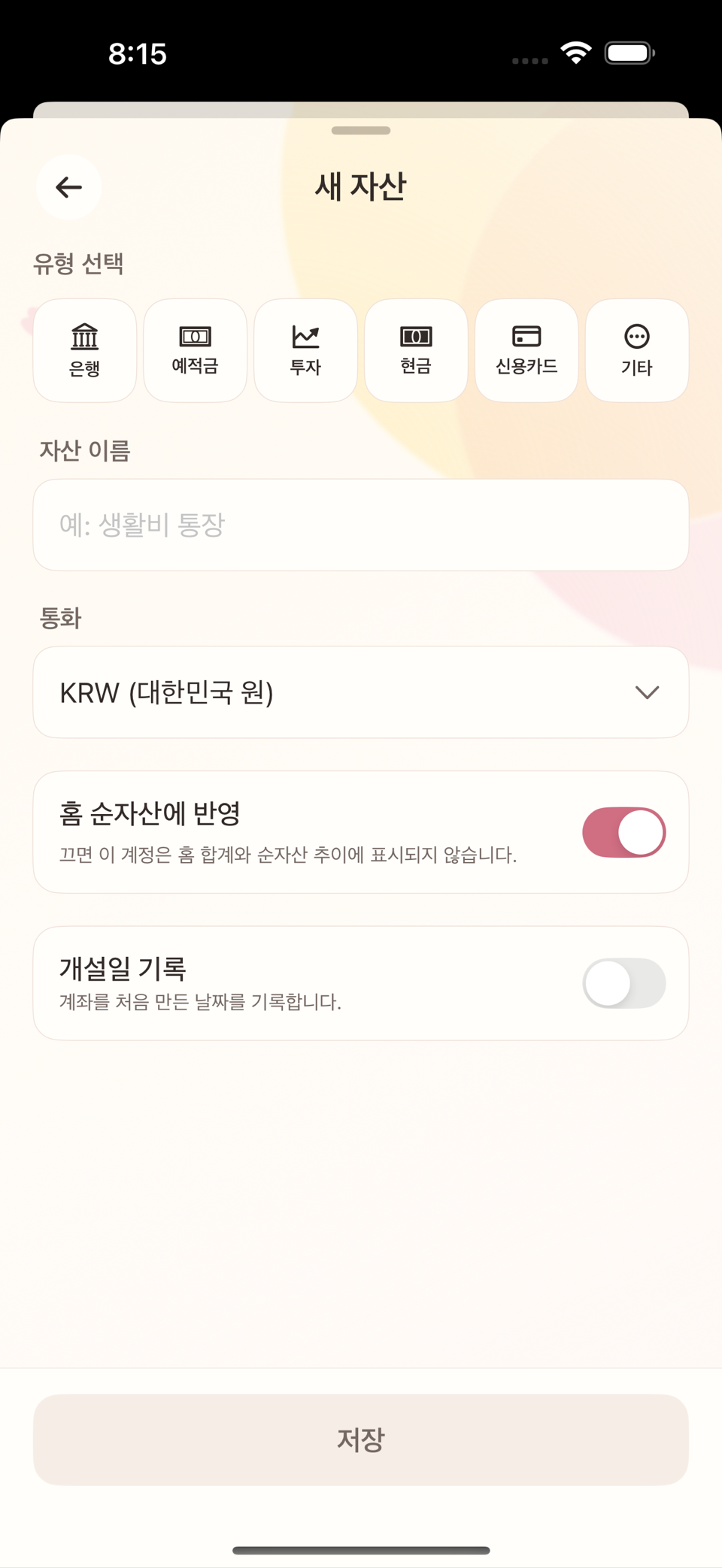
새 계정을 추가할 때 다음 여섯 유형 중 하나를 고른다.
| 유형 | 예시 | 잔액의 의미 |
|---|---|---|
| 은행 | 입출금 통장, 급여 계좌 | 실제 보유 현금 |
| 예적금 | 정기예금, 적금 | 만기까지 묶인 저축 자산 |
| 투자 | 증권 계좌 | 평가액이 아닌 실제 입출금 기준 자산 |
| 현금 | 지갑, 비상금 | 실제 보유 현금 |
| 신용카드 | 신용카드 | 결제한 만큼 쌓이는 부채(빚) — 자산이 아니다 |
| 기타 | 빌려준 돈, 빌린 돈 | 등록할 때 자산 또는 부채를 직접 고른다. 저장 후에는 바꿀 수 없다 |
신용카드는 은행·예적금·투자·현금과 성격이 다르다. 카드를 쓸수록 "이 카드로 갚아야 할 금액"이 늘어나며, 결제일에 대금을 갚으면 그 부채가 줄어든다.
화면 제목은 새 자산이고, 이름을 넣는 자산 이름 필드가 공통으로 있다.
시작 잔액을 맞춘다
새 계정을 만들 때 지금 그 계좌·카드의 실제 잔액을 입력해두면, 그 시점 잔액을 만들기 위한 거래 하나가 자동으로 생긴다. 입력 필드 이름은 유형에 따라 다르다.
- 은행·예적금·투자·현금·기타: 장부 시작 잔액. 화면에는 "별도의 기초잔액 기록이 생성됩니다. 수입이나 지출로 집계되지 않습니다"라는 안내가 함께 뜬다.
- 신용카드: 현재 사용액 — 지금까지 갚지 않고 남아 있는 카드 대금을 입력한다.
이 값은 그대로 저장되는 숫자가 아니라 시작 시점을 맞추기 위한 거래를 만드는 것이다. 이후 실제 거래가 쌓이면 화면에 표시되는 현재 잔액은 그 거래들로부터 항상 다시 계산된다.
나중에 잔액이 실제와 안 맞으면
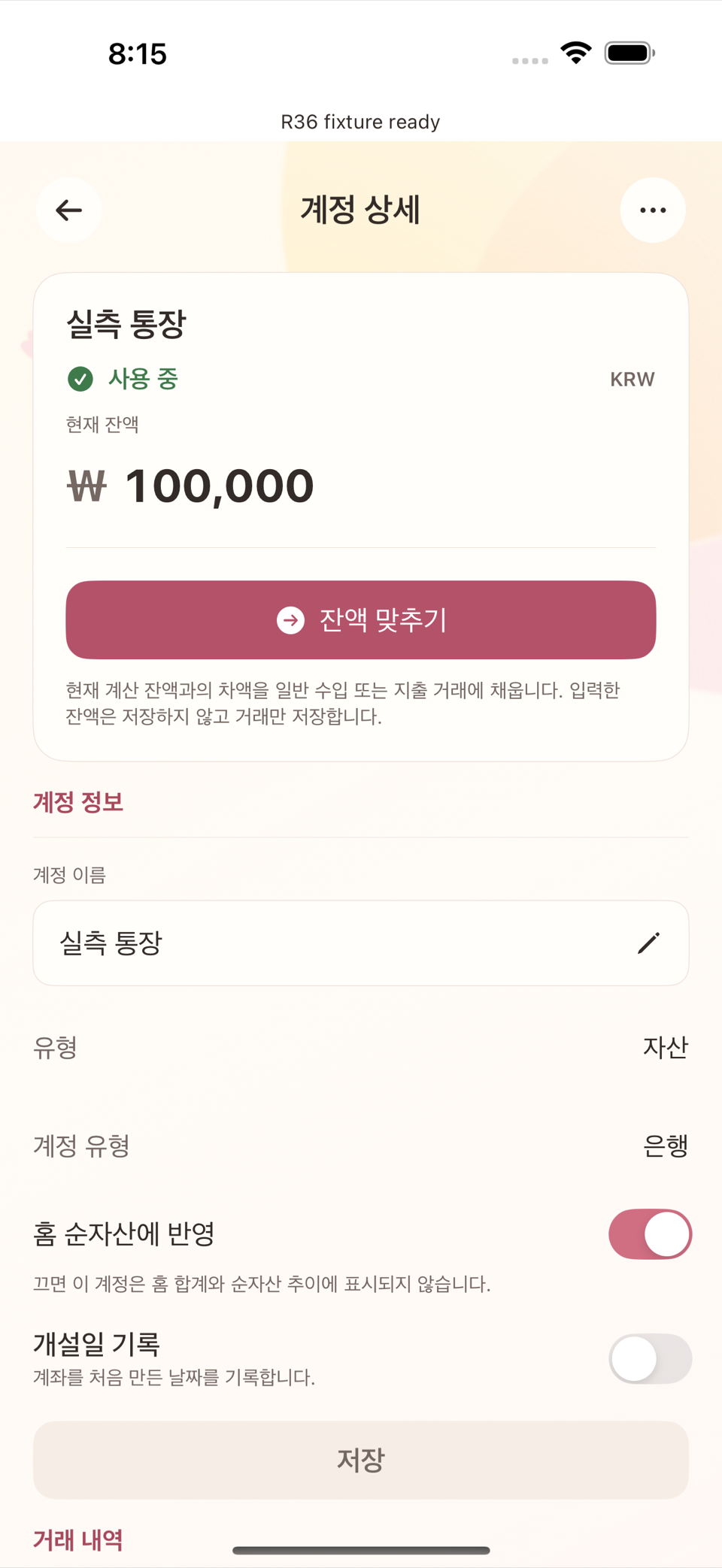
은행 앱과 타미오의 잔액이 조금씩 어긋나는 경우(누락된 거래, 반올림 등) 별도 화면을 열 필요 없이 계정 상세 화면 맨 위에 보이는 "현재 잔액" 숫자를 직접 눌러 실제 값으로 고친다. 값을 넣은 뒤 잔액 맞추기를 누르면 차액만큼의 보정 거래가 하나 생겨 잔액을 실제와 같게 만든다. 차액이 0이면 아무 거래도 만들어지지 않는다.
계정을 정리할 때
일반 계좌·카드·현금·투자 계정에는 "종료"나 "보관" 메뉴가 없다 — 계정 상세의 관리 메뉴(⋯)에는 이름 변경과 삭제만 있다. 더는 쓰지 않는 계정은 그대로 목록에 남겨 둬도 문제가 없고, 정말 지우고 싶다면 14장에서 다루는 삭제(거래 유무에 따라 동작이 다르다)를 사용한다. 예적금 계정만 예외로, 만기나 중도 해지 시 원금·이자를 입금 처리한 뒤 종료하는 별도 흐름을 계정 상세에서 제공한다.
ENGLISH
3. Creating Accounts and Starting Balances
An account is the place money actually sits, or where debt accrues (see chapter 2). This chapter covers creating a new account and getting its starting balance right.
The six account types
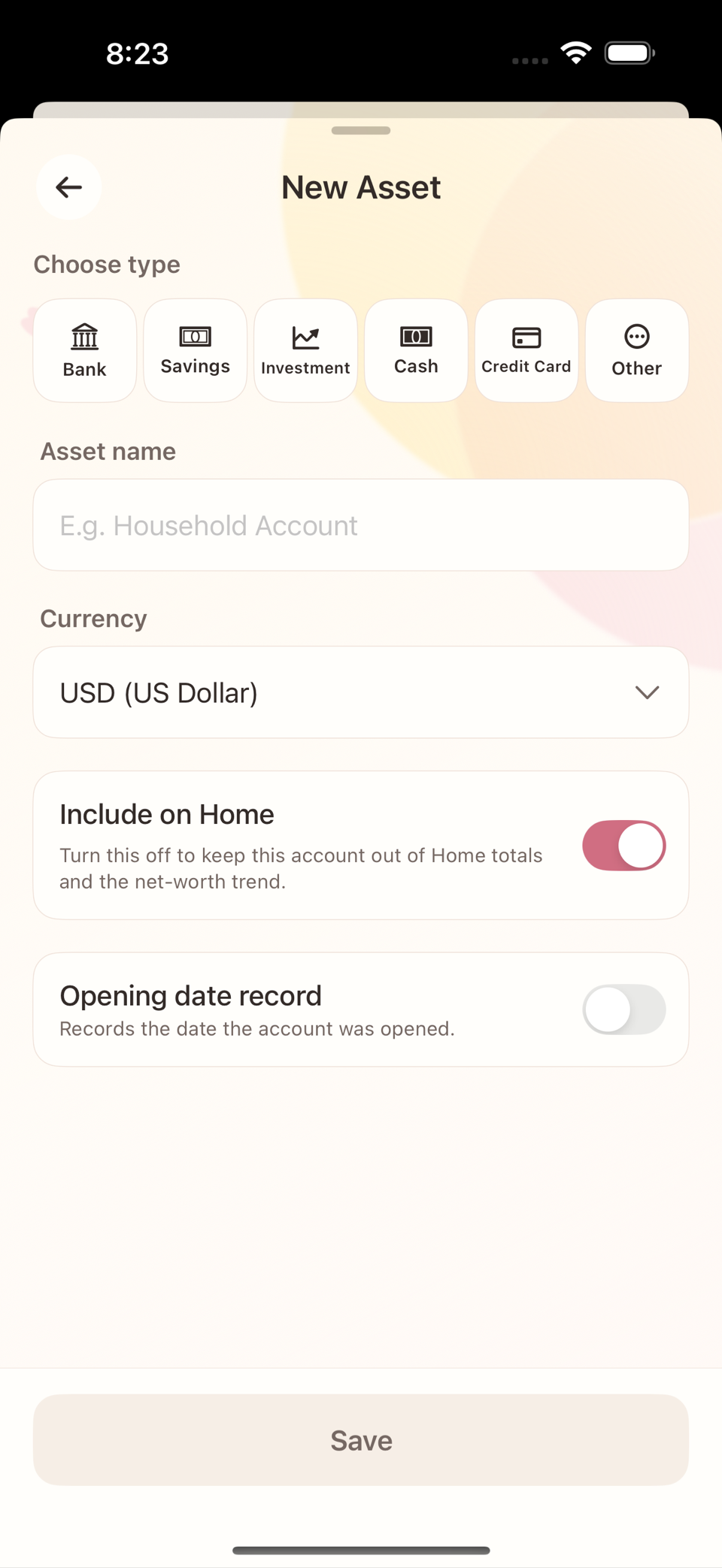
When you add a new account you choose one of these six types.
| Type | Examples | What the balance means |
|---|---|---|
| Bank | Checking account, salary account | Cash you actually hold |
| Savings | Term deposit, savings plan | Savings tied up until maturity |
| Investment | Brokerage account | Assets measured by actual deposits and withdrawals, not market value |
| Cash | Wallet, emergency cash | Cash you actually hold |
| Credit Card | Credit card | Debt that builds up as you spend — not an asset |
| Other | Money lent or borrowed | Choose whether it is an asset or debt when registering it. This cannot be changed after saving |
A credit card behaves differently from bank, savings, investment, and cash accounts. The more you use the card, the more "the amount owed on this card" grows, and paying the bill on the due date reduces that debt.
The screen is titled New Asset, and every type shares an Asset name field.
Setting the starting balance
If you enter the real current balance of the account or card when you create it, the app automatically creates one transaction that produces that balance. The name of the input field depends on the type.
- Bank, savings, investment, cash, and other: Ledger starting balance. The screen also explains that "A separate opening balance record will be created. It is not income or expense."
- Credit card: Current Usage — enter the card debt you have not yet repaid.
This value is not stored as a number; it creates a transaction that establishes your starting point. As real transactions accumulate, the Current Balance shown on screen is always recalculated from them.
When the balance later disagrees with reality
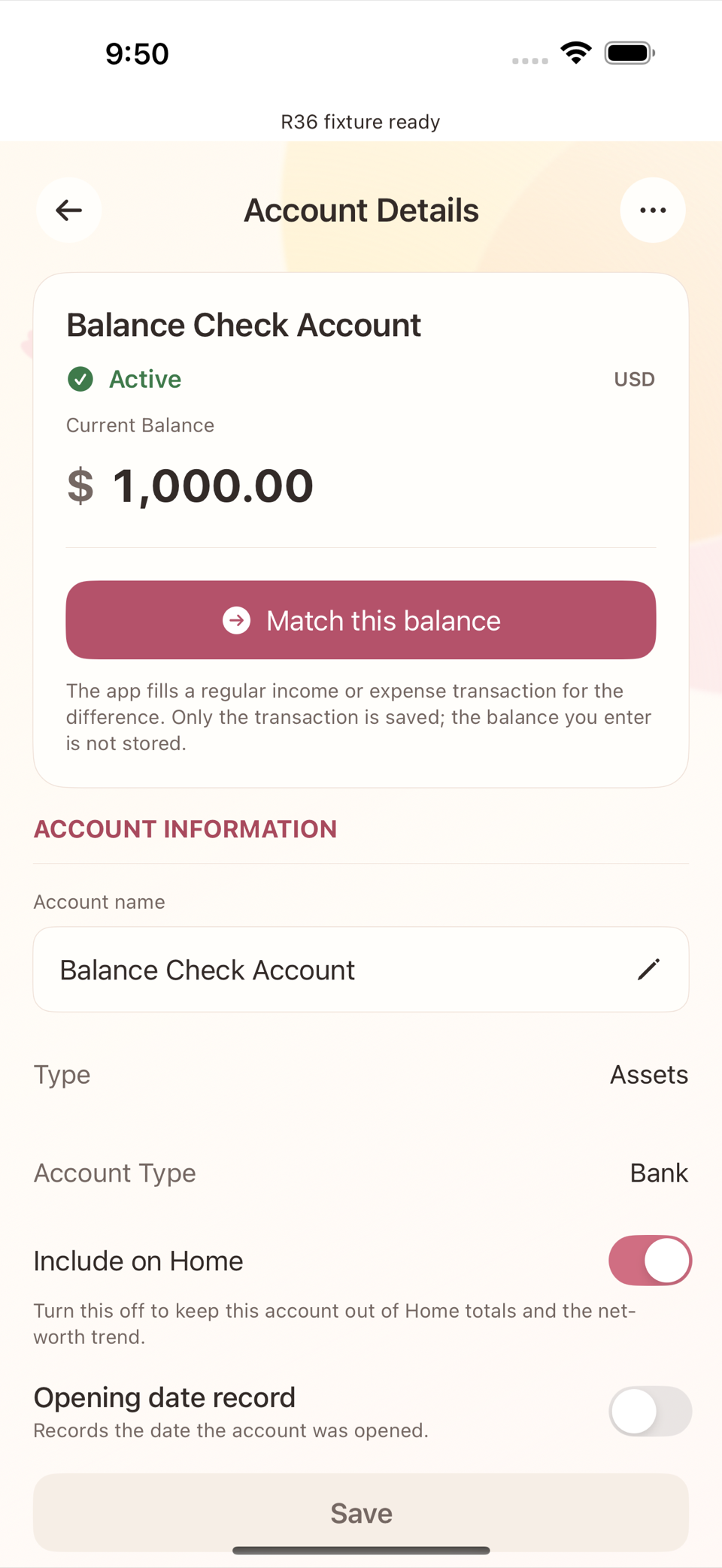
If your bank app and Tameio drift apart (a missed transaction, rounding, and so on), you do not need to open a separate screen. Tap the "Current Balance" figure at the top of the account detail screen and type the real value. Then tap Match this balance, and a single adjusting transaction for the difference is created so the balance matches reality. If the difference is zero, no transaction is created.
Tidying up accounts
Ordinary bank, card, cash, and investment accounts have no "close" or "archive" menu — the manage menu (⋯) on the account detail screen offers only rename and delete. It is perfectly fine to leave an account you no longer use sitting in the list. If you really want it gone, use the deletion described in chapter 14 (which behaves differently depending on whether the account has transactions). Savings accounts are the one exception: the account detail screen offers a separate flow to record the principal and interest on maturity or early termination and then Close the account.